TinyMCE 7.x版 ツールバーにリンクカードボタンを実装

TinyMCE 5.x以降(7.x)で、ツールバーにリンクカードを挿入するボタンを実装するメモ。

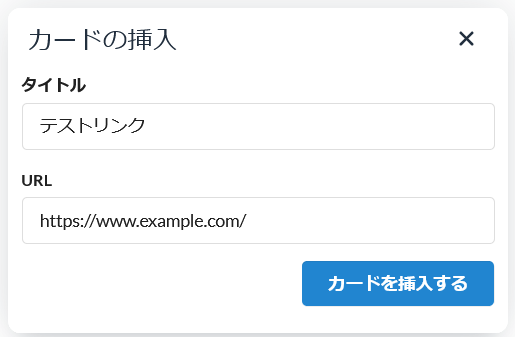
link_card.html
<!DOCTYPE html>
<html lang="en">
<head>
    <meta charset="UTF-8">
    <meta name="viewport" content="width=device-width, initial-scale=1.0">
    <title>Link Card Inserter</title>
    <link rel="stylesheet" href="https://cdnjs.cloudflare.com/ajax/libs/semantic-ui/2.5.0/semantic.min.css">
</head>
<body>

    <div style="padding:10px;">
        <form class="ui form">
            <div class="field">
                <label>タイトル</label>
                <input type="text" id="linkTitle" value="テストリンク">
            </div>
            <div class="field">
                <label>URL</label>
                <input type="text" id="linkURL" value="https://www.example.com/">
            </div>
            <button onclick="insertCard()" class="ui button primary right floated">カードを挿入する</button>
        </form>
    </div>

    <script>
        function insertCard() {
            const title = document.getElementById('linkTitle').value;
            const url = document.getElementById('linkURL').value;
            if (title && url) {
                const content = `<a href="${url}" target="_blank">${title}</a>`;
                // 親ウィンドウにメッセージを送信
                window.parent.postMessage({
                    mceAction: 'insert',
                    content: content
                }, '*');
            } else {
                alert('タイトルとURLを記入してください。');
            }
        }
    </script>
</body>
</html>
CSS
.cm-card:hover{
	background:#fafdff;
}
/*カード枠*/
.cm-card{
	border:1px solid #cccccc;
	border-radius:5px;
	display:flex;
	justify-content:space-between;
	max-height:90px;
	overflow:hidden;
	transition:.5s;
}
/*コンテンツ枠*/
.cmc-cont{
	padding:10px;
	flex: 1 1;
}
.cmc-img{
	max-width:30%;
	}
.cmc-img img{
	width:100%;
	height:100%;
	max-height:100px;
	object-fit:cover;
	border-radius:0 5px 5px 0;
	margin-bottom:-10px;
}
/*タイトル枠*/
.cmc-ttl{
	color:#333;
	font-weight:bold;
	font-size:1.4rem;
	margin-bottom:2px;
}
/*説明文*/
.cmc-desc{
	color:#aaaaaa;
}
Javascript
toolbar: [mycard],

setup: function (editor) {
    editor.ui.registry.addButton('mycard', {
        icon: 'embed-page',
        tooltip:"カードの挿入",
        onAction: function () {
            let currentEditor = editor;
            editor.windowManager.openUrl({
                title: 'カードの挿入',
                url: './link_card.html',
                width: 400,
                height: 260,
                onMessage: function (api, details) {
                    if (details.mceAction === 'insert') {
                        currentEditor.insertContent(details.content);
                        api.close();
                    }
                }
            });
        }
    });
}


// グローバルメッセージハンドラー
window.addEventListener('message', function(event) {
    if (event.data.mceAction === 'insert') {
        // アクティブなエディターを取得
        let activeEditor = tinymce.activeEditor;
        if (activeEditor) {
            activeEditor.insertContent(event.data.content);
            // アクティブなダイアログを閉じる
            activeEditor.windowManager.close();
        }
    }
});