TinyMCE7.2+CKFinder3.7.0

TinyMCE7.2を使いたくて、ファイルマネージャーを探していたらCKFinderを見つけたので組み合わせて実装してみた。特にアカウント登録とかも不要だった。
TinyMCE7.2の実装
公式からJSファイルをダウンロード
https://www.tiny.cloud/get-tiny/
JSを読み込んでinitするだけで、基本的には旧バージョンと同じ。
最小構成サンプル
<script src="./js/tinymce/tinymce.min.js"></script>
tinymce.init({
  selector: '#mytextarea',
  language: 'ja',
  theme :"silver",
  body_class: "tiny_mce_class",
  content_css : "./css/editor.css",
  height: 500,
  toolbar_sticky: true,
  menubar: false,
  branding: false,
  license_key: 'gpl',
  plugins: 'code preview link image table fullscreen lists',
  toolbar: ['code preview undo redo cut copy paste styles bold italic underline strikethrough forecolor backcolor removeformat link unlink hr alignleft aligncenter alignright bullist numlist image table fullscreen'],
});
<textarea id="mytextarea">Hello, World!</textarea>
CKFinderを組み込む
CKFinderをダウンロード
https://ckeditor.com/ckfinder/download/
jsフォルダの中にtinymce、ckfinderを置くように配置。
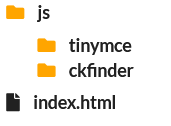
ckfinder/config.phpを編集
66行目あたり baseUrl を /files/ に変更
$config['backends'][] = array(
    'name'         => 'default',
    'adapter'      => 'local',
    'baseUrl'      => '/files/',
//  'root'         => '', // Can be used to explicitly set the CKFinder user files directory.
    'chmodFiles'   => 0777,
    'chmodFolders' => 0755,
    'filesystemEncoding' => 'UTF-8',
);
CKfinderの動作環境にPHP8.2以上が必要だったためテスト環境のMAMPを最新にアップデートして8.3を使用。
MAMP/conf/php8.3.1/php.ini に以下を追加。
extension=fileinfo
MAMP環境では権限がなかったので、
ckfinder/conf.phpの28行目あたり、
return false を return true に変更。
実稼働時にはセキュリティ処理が必要。
$config['authentication'] = function () {
    return true;
};
ckfinderを読み込む
<script src="./js/ckfinder/ckfinder.js"></script>
TinyMCE init({})に追加
tinymce.init({
  selector: 'textarea',
  plugins: 'image',
  toolbar: 'image ckfinder',
  setup: function(editor) {
    editor.ui.registry.addButton('ckfinder', {
      text: 'Insert Image',
      onAction: function() {
        openCKFinder(editor);
      }
    });
  },
  file_picker_callback: function(callback, value, meta) {
    if (meta.filetype == 'image') {
      openCKFinder(tinymce.activeEditor, callback);
    }
  }
});

function openCKFinder(editor, callback) {
  CKFinder.modal({
    chooseFiles: true,
    width: 800,
    height: 600,
    onInit: function(finder) {
      finder.on('files:choose', function(evt) {
        var file = evt.data.files.first();
        var url = file.getUrl();
        if (callback) {
          callback(url, {text: file.get('name')});
        } else {
          editor.insertContent('<img src="' + url + '">');
        }
      });
      finder.on('file:choose:resizedImage', function(evt) {
        var url = evt.data.resizedUrl;
        if (callback) {
          callback(url, {text: evt.data.name});
        } else {
          editor.insertContent('<img src="' + url + '">');
        }
      });
    }
  });
}
toolbar: に追加する
toolbar: 'ckfinder',
アイコンを変更
このままだと、ツールバーに「画像の挿入」と表示されているので、アイコンに変更する。
マテリアルデザインスタイルのアイコンセットを使用時
icons: 'material',
TinyMCEにあるアイコンを使用
text:の部分を以下に変更
icon: 'upload',
tooltip: 'ファイルのアップロード',
ソース全体
<!doctype html>
<html lang="ja">
<head>
<meta charset="utf-8">
<meta name="viewport" content="width=device-width, initial-scale=1, user-scalable=no, maximum-scale=1.0">
<title>TinyMCE7</title>
<script src="./js/tinymce/tinymce.min.js"></script>
<script src="./js/ckfinder/ckfinder.js"></script>
<script>
tinymce.init({
selector: '#mytextarea',
language: 'ja',
theme :"silver",
body_class: "tiny_mce_class",
content_css : "./css/editor.css",
height: 500,
toolbar_sticky: true,
menubar: false,
branding: false,
license_key: 'gpl',
icons: 'material',
plugins: 'code preview link image table fullscreen lists',
toolbar: ['code preview undo redo cut copy paste styles bold italic underline strikethrough forecolor backcolor removeformat link unlink hr alignleft aligncenter alignright bullist numlist image ckfinder table fullscreen'],
setup: function(editor) {
editor.ui.registry.addButton('ckfinder', {
icon: 'upload',
tooltip: 'ファイルのアップロード',
onAction: function() {
openCKFinder(editor);
}
});
},
file_picker_callback: function(callback, value, meta) {
if (meta.filetype == 'image') {
openCKFinder(tinymce.activeEditor, callback);
}
}
});
function openCKFinder(editor, callback) {
CKFinder.modal({
chooseFiles: true,
width: 800,
height: 600,
onInit: function(finder) {
finder.on('files:choose', function(evt) {
var file = evt.data.files.first();
var url = file.getUrl();
if (callback) {
callback(url, {text: file.get('name')});
} else {
editor.insertContent('<img src="' + url + '">');
}
});
finder.on('file:choose:resizedImage', function(evt) {
var url = evt.data.resizedUrl;
if (callback) {
callback(url, {text: evt.data.name});
} else {
editor.insertContent('<img src="' + url + '">');
}
});
}
});
}
</script>
</head>
<body style="padding:10px;">
<textarea id="mytextarea">Hello, World!</textarea>
<p> </p>
<p> </p>
</body>
</html>
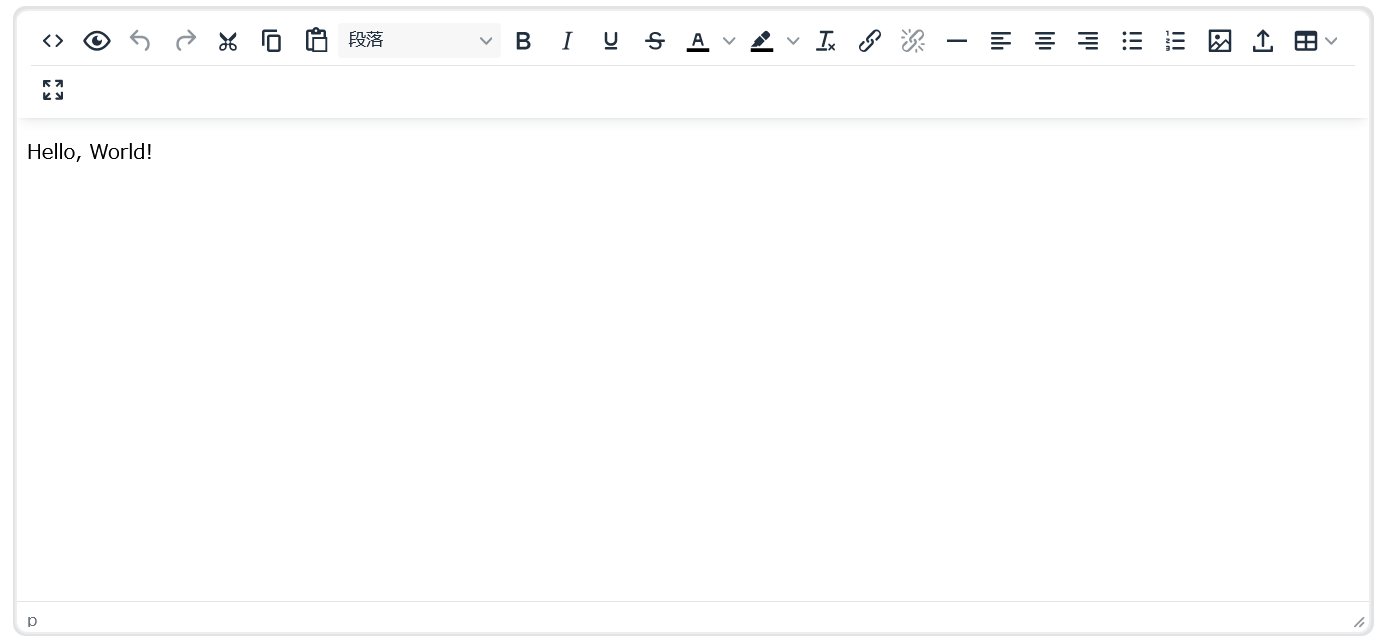
カスタムアイコンを使う
アイコンを既存の物ではなく、独自の物を使用する場合、SVGなども使える。
tinymce.init({
  // ... 他の設定 ...
  setup: function(editor) {
    editor.ui.registry.addIcon('custom-image', '<svg width="24" height="24" focusable="false">  <path d="M10.7 20H4a2 2 0 0 1-2-2V5a2 2 0 0 1 2-2h3.9a2 2 0 0 1 1.69.9l.81 1.2a2 2 0 0 0 1.67.9H20a2 2 0 0 1 2 2v4.1M17 17a3 3 0 1 0 0-6 3 3 0 0 0 0 6zm0 0 3 3" fill="none" stroke="currentColor" stroke-width="2" stroke-linecap="round" stroke-linejoin="round"/></svg>');

    editor.ui.registry.addButton('ckfinder', {
      icon: 'custom-image',
      tooltip: '画像の挿入',
      onAction: function() {
        openCKFinder(editor);
      }
    });
  },
  // ... 他の設定 ...
});
全体
<!doctype html>
<html lang="ja">
<head>
<meta charset="utf-8">
<meta name="viewport" content="width=device-width, initial-scale=1, user-scalable=no, maximum-scale=1.0">
<title>TinyMCE7</title>
<script src="./js/tinymce/tinymce.min.js"></script>
<script src="./js/ckfinder/ckfinder.js"></script>
<script>
tinymce.init({
selector: '#mytextarea',
language: 'ja',
theme :"silver",
body_class: "tiny_mce_class",
content_css : "./css/editor.css",
height: 500,
toolbar_sticky: true,
menubar: false,
branding: false,
license_key: 'gpl',
plugins: 'code preview link image table fullscreen lists',
toolbar: ['code preview undo redo cut copy paste styles bold italic underline strikethrough forecolor backcolor removeformat link unlink hr alignleft aligncenter alignright bullist numlist image ckfinder table fullscreen'],
setup: function(editor) {
editor.ui.registry.addIcon('custom-image', '<svg width="24" height="24" focusable="false"> <path d="M10.7 20H4a2 2 0 0 1-2-2V5a2 2 0 0 1 2-2h3.9a2 2 0 0 1 1.69.9l.81 1.2a2 2 0 0 0 1.67.9H20a2 2 0 0 1 2 2v4.1M17 17a3 3 0 1 0 0-6 3 3 0 0 0 0 6zm0 0 3 3" fill="none" stroke="currentColor" stroke-width="2" stroke-linecap="round" stroke-linejoin="round"/></svg>');
editor.ui.registry.addButton('ckfinder', {
icon: 'custom-image',
tooltip: 'ファイルのアップロード',
onAction: function() {
openCKFinder(editor);
}
});
},
file_picker_callback: function(callback, value, meta) {
if (meta.filetype == 'image') {
openCKFinder(tinymce.activeEditor, callback);
}
}
});
function openCKFinder(editor, callback) {
CKFinder.modal({
chooseFiles: true,
width: 800,
height: 600,
onInit: function(finder) {
finder.on('files:choose', function(evt) {
var file = evt.data.files.first();
var url = file.getUrl();
if (callback) {
callback(url, {text: file.get('name')});
} else {
editor.insertContent('<img src="' + url + '">');
}
});
finder.on('file:choose:resizedImage', function(evt) {
var url = evt.data.resizedUrl;
if (callback) {
callback(url, {text: evt.data.name});
} else {
editor.insertContent('<img src="' + url + '">');
}
});
}
});
}
</script>
</head>
<body style="padding:10px;">
<textarea id="mytextarea">Hello, World!</textarea>
<p> </p>
<p> </p>
</body>
</html>
エディタの中身だけ指定ピクセル以上に広がらないようにするCSS
editor.css
body.tiny_mce_class{
	width:800px;
	max-width:100%;
}

.tiny_mce_class img{
	max-width:100%;
	height:auto;
}